Mobile guide · Insights
Use Coach365 and your weekly focus
Turn resolved match history into a practical focus and explore the rules learning corner.
iOS app · Updated
Published (first source record):
iOS version checked: Not recorded; current version not verified · Android version checked: Not recorded; current version not verified
The publication date is the first article record on main; the original production publication time was not recorded. Screenshot capture dates and versions are listed separately.
Example screenshots show the English interface. The written content follows your selected language.
Open your coaching
Coach365 uses recorded match activity to provide a weekly focus. Access may require Pro.
- Open Pulse and select the Coach365 card.
- Read the report period and the match count behind the focus.
- Open the referenced results to understand what the suggestion is based on.
- Choose a practical focus for your next session, then keep logging complete scores and opponents.
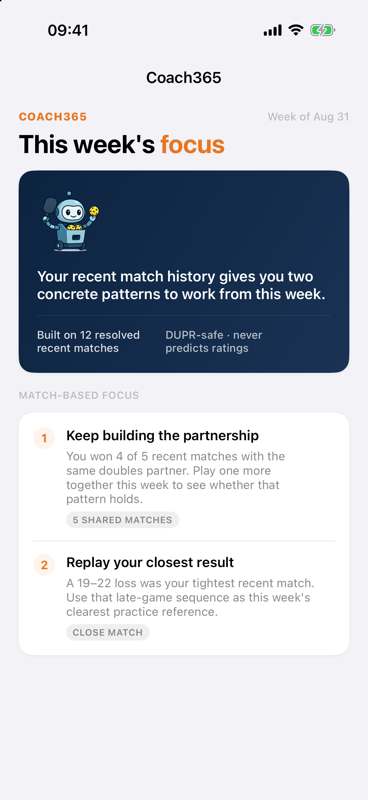
Weekly focus suggestions explain the recorded matches behind each observation. Your report depends on your own history.
Screenshot platform: iOS · Version: Not recorded
Captured: Not recorded. Tap the image to enlarge.
No report yet
Coach365 needs resolved results before it can show a match-based focus. If the app says No report yet or Your next report is being prepared, check your recent history and allow processing to finish. If it reports a load error, use Try again.
Understand the limits of the advice
A score history can show patterns in outcomes; it cannot establish every technical detail of how you played. Read suggestions alongside the matches cited. Coach365 does not predict your official DUPR rating.
Explore the learning corner
Open the USA Pickleball Rule of the Day in Coach365. The short explanation is a learning aid. Use View the official USA Pickleball rulebook for the authoritative wording.